
Dominate the Land of Dawn with instant Mobile Legends Diamonds from Buffget.
Skip the slow in-app store and top up securely in seconds—no password, only your User ID & Zone ID. Choose from 13 to 6,012 Diamonds (or grab the Twilight Pass / Starlight Membership) and watch them land in-game the moment payment clears.
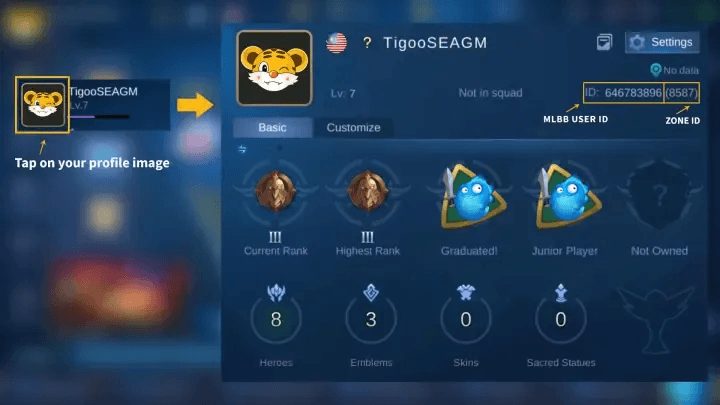
1. How to Find Your MLBB User ID & Zone ID
- Open Mobile Legends: Bang Bang.
- Tap your avatar at the top-left of the main screen.
- Under Basic Info, copy the long number (User ID) and the bracketed number (Zone ID) – e.g. 1030612204(13124).
2. How to Buy Mobile Legends Diamonds – Instant Global MLBB Top-Up
- Select Mobile Legends: Bang Bang Diamonds.
- Paste your User ID and Zone ID.
- Pick a Diamonds package (e.g. 50, 100, 300, 500).
- Choose your payment method (credit card, e-wallet, PayPal, etc.).
- Confirm and pay — Diamonds arrive instantly.
Why top-up with Buffget?
- Ultra-low prices & promo bundles – we beat Codashop-level rates and honour the official 2× first-recharge bonus.
- Lightning delivery – automated API pushes Diamonds straight to your account in under 30 seconds.
- 50+ payment methods worldwide – Visa/Mastercard, TNG, GCash, OVO, crypto and more.
- 24/7 human support – reach us on live chat, Discord or WhatsApp any time.
- Moonton-approved – we top up via the official gateway, so your account stays safe.